Part 1: Is There a Working AVCLabs Video Enhancer AI Crack?
You might see some content online claiming to offer a "usable" cracked version of AVCLabs Video Enhancer AI, but finding a stable and fully functional cracked version is another matter. Unauthorized activation may therefore stop working or return the software to trial mode.
More importantly, a cracked copy may not provide the latest AI models, bug fixes, or new features. Instead of using an unknown modified installer, it is safer to use an official free trial version of AVCLabs Video Enhancer AI to test the software with your own video footage.
| AI Feature |
Function |
| AI Enhancement |
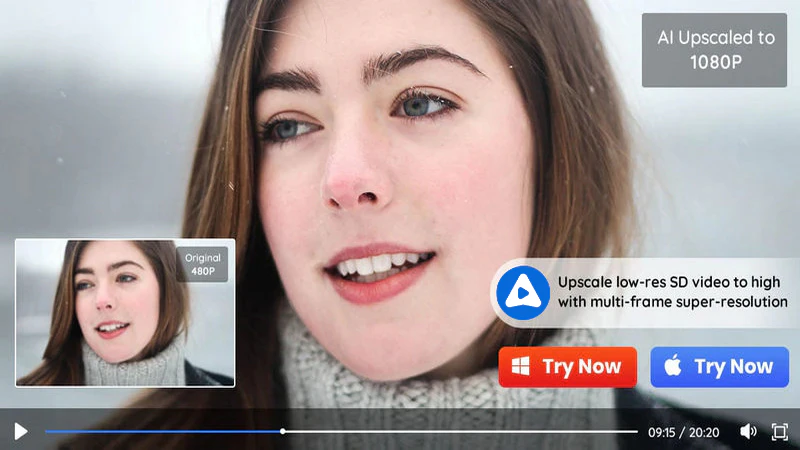
Upscale low-resolution videos (480p and 720p) to Full HD (1080p), 4K, or even 8K resolution. Automatically remove noise and blur, enhancing details for clearer videos. |
| AI Face Enhancement |
Focuses on improving the clarity and details of faces in videos, optimizing skin tone and facial features, making people look more natural and vivid. |
| AI Colorize |
Add color to black and white footage, adjust the color balance, and fix overexposed or underexposed areas. |
| AI Motion Compensation |
Generate intermediate frames to achieve smoother motion or slow-motion effects. |
| AI SDR to HDR |
Convert standard dynamic range footage to HDR output for viewing on compatible display devices. |
| Video Stabilization |
Reduce unwanted camera shake in handheld video footage. |
| Video Blur |
Blur faces, license plates, backgrounds, and selected objects; includes object tracking and customizable blur settings. |
Actually, you don't need to use the cracked version; AVCLabs Video Enhancer AI offers a free trial version. You can test the AI features, then compare the preview with the original to check detail, color consistency, and motion. This allows you to evaluate the software's visual enhancement capabilities and processing time on your own computer.
Part 2: How to Use AVCLabs Video Enhancer AI Full Version [Official Way]
Is it difficult to download and install AVCLabs Video Enhancer AI? No, downloading and installing AVCLabs Video Enhancer AI is easy and can be done in no more than 5 minutes. Just follow the steps below.
Key Features of AVCLabs Video Enhancer AI
- Enhance video clarity and upscale resolution to 4K or 8K
- Reduce noise and improve blurry facial details
- Colorize footage and convert SDR videos to HDR
- Smooth motion and stabilize shaky footage
- Blur specific areas in the enhanced video to protect privacy
Step 1 Download and Install AVCLabs Video Enhancer AI
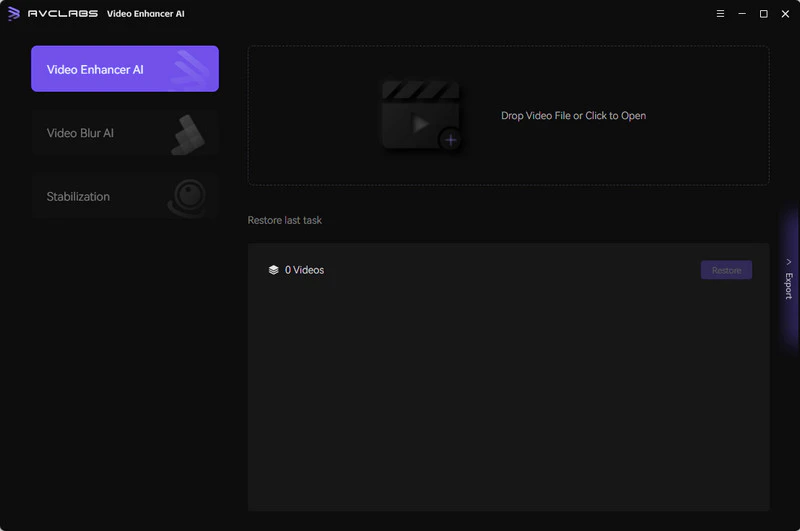
Click the button above to download AVCLabs Video Enhancer AI from the official website. Once downloaded, you can install and launch it. The whole process should take no more than 5 minutes.
Step 2 Drop Your Video File to Video Enhancer AI
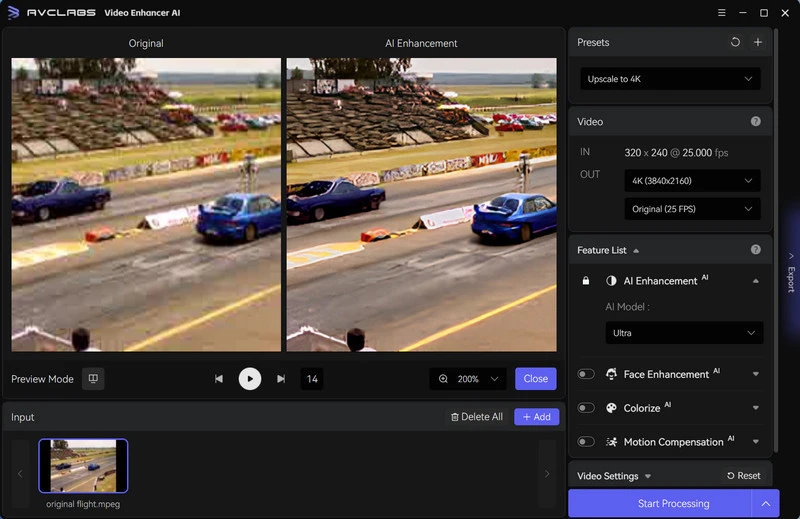
On the right, you can see the video resolution settings, AI feature list, video settings, and output settings. You only need to select the desired video quality (1080p, 2K, 4K, 8K) and AI feature on the right. Under normal circumstances, the standard model is sufficient to meet the needs.
Adding more AI features will increase the hardware requirements: System Requirements >>
Step 3 Start Processing High-Quality Video
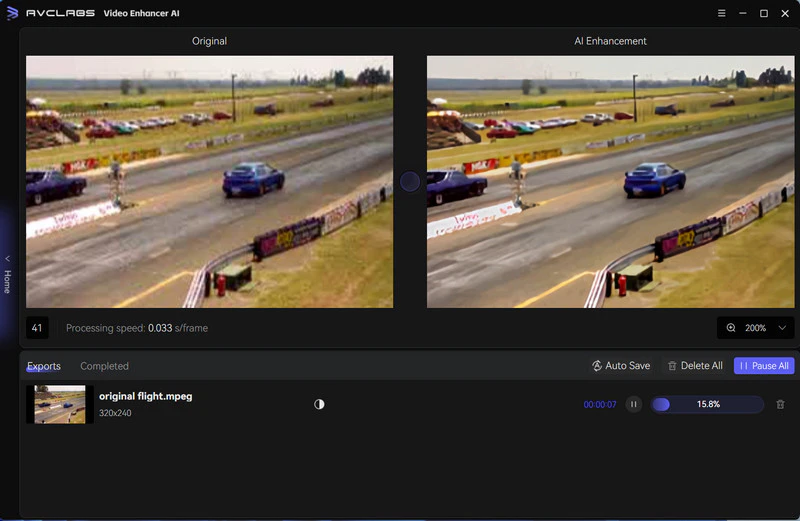
Click "Export" to export the enhanced video.
Part 3: Risks of Using a Cracked AI Video Enhancer
Cracked programs are not safe to use. You never know what kind of malicious code they might be hiding. There will be a lot of risks when using the cracked AVCLabs Video Enhancer AI posted by various websites on the Internet.
Risk 1. Malware and Data Theft
- Hidden malware: Unofficial installers may bundle the application with Trojans, adware, or other unwanted software.
- Stolen account information: Malicious components may collect saved passwords, browser session cookies, or personal files.
Risk 2. Broken AI Models and No Updates
- Missing model updates: Unofficial modified versions may fail to receive the latest AI models and updates, leaving users restricted to older enhancement models and features.
- No official troubleshooting support: AVCLabs states that its support team does not provide fixes or technical support for cracked versions.
Risk 3. Legal and License Risks
- License violations: AVCLabs' terms of use prohibit bypassing its protection technologies, as well as creating or distributing cracked versions.
- Potential copyright issues: Unauthorized copying, modification, or distribution may also violate copyright laws.
How to Check You Downloaded the Official Installer
Download AVCLabs Video Enhancer AI from the official website. Before installation, right-click the Windows installer file, go to "Properties" → "Digital Signatures," and verify that there is a valid digital signature from the publisher, Anvsoft Inc. In addition, scan the file using the latest antivirus software and ensure that protection features are enabled.
⚠️ A valid signature and a clean scan result are valuable checking methods, but neither can ensure that the installation package is absolutely harmless. Please ensure you also use official download channels.
Part 4: Legal Ways to Get AVCLabs Video Enhancer AI for Free (or for Less)
AVCLabs Video Enhancer AI plans start at $39.95 per month. If you think it is still too high, you can use these four legal methods to get AVCLabs Video Enhancer AI for free or for less.
Method 1: Use AVCLabs Video Enhancer AI Free Trial
AVCLabs Video Enhancer AI offers a free trial version that allows you to export 30-second videos with a watermark for free. Therefore, you can trim your video to less than 30 seconds and enhance it. AVCLabs Video Enhancer AI only limits the export of videos. In the free trial version, you can still try all the AI features and preview the effects.
Method 2: Try Any Video Converter AI Video Enhancer
If you are looking for a legitimate and more affordable alternative, Any Video Converter AI Video Enhancer is a great choice. It can be used to improve video clarity, reduce noise, and upscale video footage to 4K resolution. Complemented by built-in format conversion and editing tools, it allows you to perform video enhancement, trimming, cropping, and format conversion all within a single application.
Key Features of Any Video Converter AI Video Enhancer
- Choose 1080p, 2K, 4K, or select percentage settings such as 100%, 200%, and 400%.
- Standard & Ultra models for visual enhancement, Denoise for noisy footage, and Anime for animation.
- Improve facial clarity and adjust the enhancement level based on your video footage.
- One-stop trimming, cropping, merging, and additional video editing tools.
Regarding processing speed: The actual speed depends on your computer's GPU, the selected model, and the output resolution. The "Ultra" model requires more processing time. Before exporting the entire file, it is recommended to preview the results to assess how well the file has been optimized for your footage.
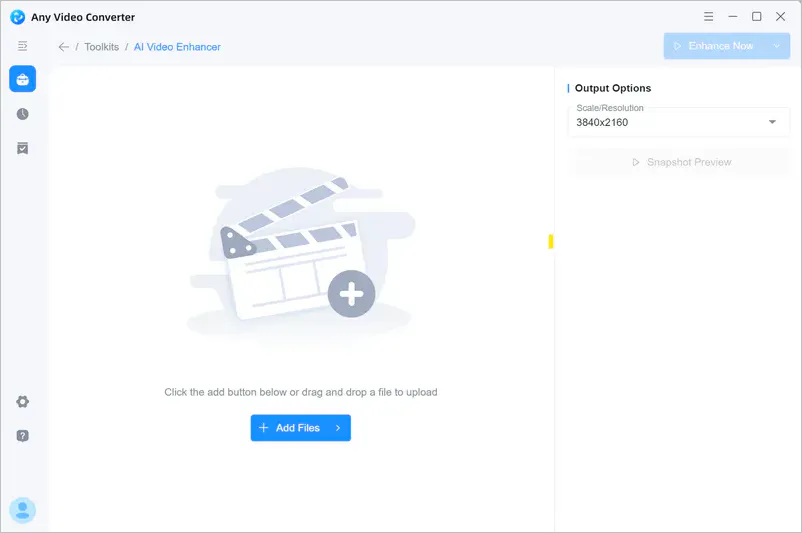
Step 1 Open Any Video Converter and select AI Video Enhancer from Toolkits. Upload your video file.
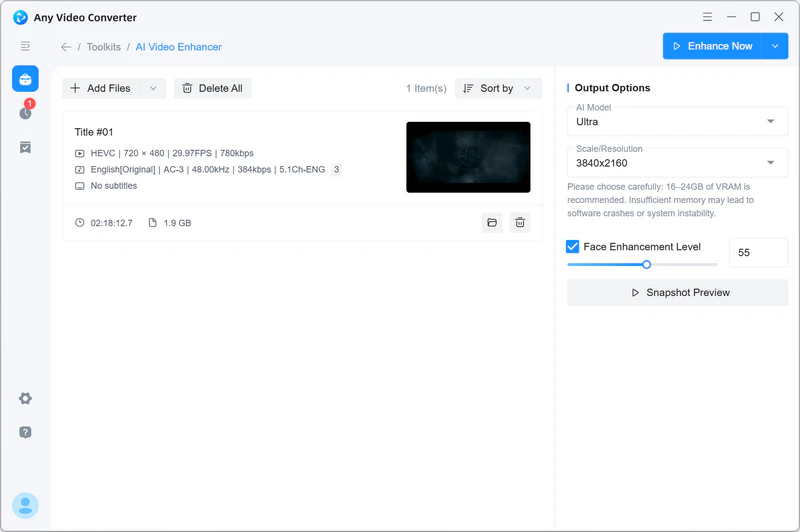
Step 2 In Output Options, open the AI Model menu and select Standard, Ultra, Denoise, or Anime based on your footage. Under Scale/Resolution, choose a percentage to scale your video or select your preferred output resolution.
Step 3 If there are faces in the video, you can enable "Face Enhancement Level" and adjust it.
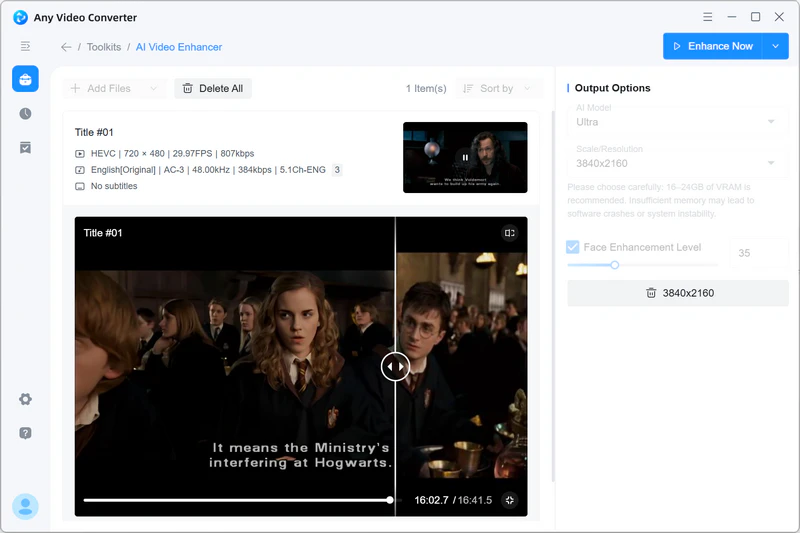
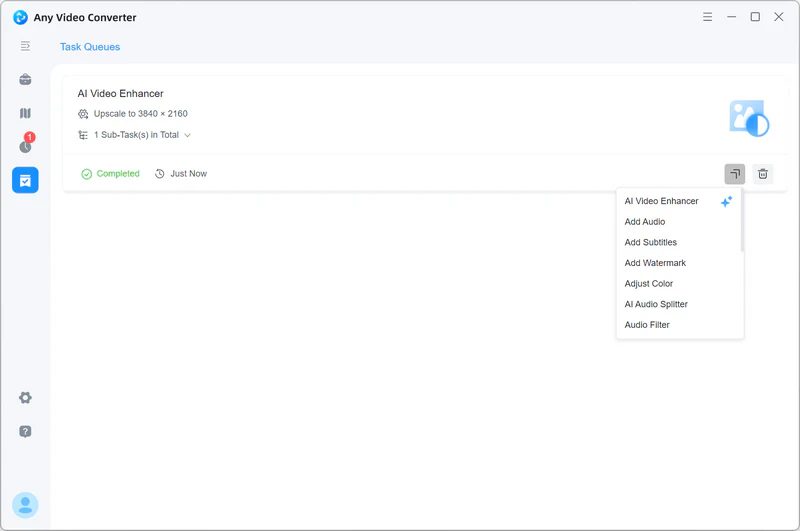
Step 4 Click "Snapshot Preview" to view the enhancements applied to a single frame. Once you are satisfied with the settings, click "Enhance Now" to start processing.
Method 3: Keep an Eye on Discounts
AVCLabs occasionally offers software promotions, discounts, and even giveaways, especially during major holidays like Halloween, Christmas, and Black Friday. You can visit their website or social media from time to time to stay updated on the latest deals.
Method 4: Contact AVCLabs Support Team
If you want to know more about the free version, you can contact the official support team through [email protected]. The support team can explain the current trial limits, licensing options, and any available promotions.
Part 5: FAQ About AVCLabs Video Enhancer AI Crack
AVCLabs Video Enhancer AI vs Any Video Converter: Which should you choose?
| Feature |
AVCLabs Video Enhancer AI |
Any Video Converter AI Video Enhancer |
| Maximum Enhanced Resolution |
Up to 8K |
Up to 4K |
| Key AI Features |
Enhancement, denoising, face enhancement, colorization, blurring, stabilization |
Enhancement, denoising, face enhancement |
| Old Video Restoration |
More advanced, suitable for black-and-white footage, low-resolution videos, and more complex restoration |
Better suited for everyday quality enhancement and denoising |
| Additional Tools |
Limited, you can trim video length |
Rich, including video downloading, conversion, compression, trimming, and more |
| Free Trial Limitations |
30-second exports with watermark |
Full AI enhancement trial outputs include a watermark |
| Starting Price |
$39.95/month |
$29.95/month |
If you require more professional restoration features, such as 8K upscaling, colorization of black and white footage, face restoration, frame interpolation, or video stabilization—AVCLabs Video Enhancer AI is a better choice for you.
If your primary needs are noise reduction, face enhancement, 4K resolution image quality improvement, and you have a limited budget, then Any Video Converter AI Video Enhancer is the better choice.
Is it safe to download a cracked copy of AVCLabs Video Enhancer AI?
No. The article clearly points out the risks of downloading a cracked version of AVCLabs Video Enhancer AI. If you are satisfied with AVCLabs Video Enhancer AI, it is recommended to purchase the official software. It not only provides complete features and stable services but also allows you to enjoy official technical support and updates.
Will a cracked version of AVCLabs Video Enhancer AI work properly?
There are many problems with using the cracked version of AVCLabs Video Enhancer AI, and it is usually not guaranteed to work properly.
Is there a free trial version of AVCLabs Video Enhancer AI?
Yes, AVCLabs Video Enhancer AI offers a free trial version. In the free trial version, you can export videos of up to 30 seconds with a watermark for free.
Are there free or cheaper alternatives to AVCLabs Video Enhancer AI?
AVC.AI and Any Video Converter are the cheaper alternatives to AVCLabs Video Enhancer AI.
 How to Increase Video Quality for Free: Beginner, Professional, Online >>
Any Video Converter AI Magic - Sharpening & Denoising
What are the risks of using AVCLabs Video Enhancer AI crack on my PC?
There are many risks associated with using the AVCLabs Video Enhancer AI cracked version, such as malware and viruses, data loss and corruption, limited functionality, license, copyright risks, and more.
Conclusion
AVCLabs Video Enhancer AI is a simple yet powerful video enhancer. In this article, we delve into the issue of cracked versions of AVCLabs Video Enhancer AI and highlight the legal risks and potential security risks associated with cracked software. Therefore, we strongly recommend avoiding cracked versions and opting for legal means to download and use AVCLabs Video Enhancer AI. By using official software, you can enjoy high-quality video enhancement while avoiding unnecessary legal and security issues.

Besty Smith | Content Writer
Besty Smith is a talented and insightful content creator with a keen interest and passion for software programs. She focuses on in-depth research and hands-on experience with various types of software, providing readers with in-depth and inspiring content through precise writing. With her keen insight into the software industry, Besty is committed to helping readers keep abreast of the latest industry trends so that they can stay competitive in the digital age.